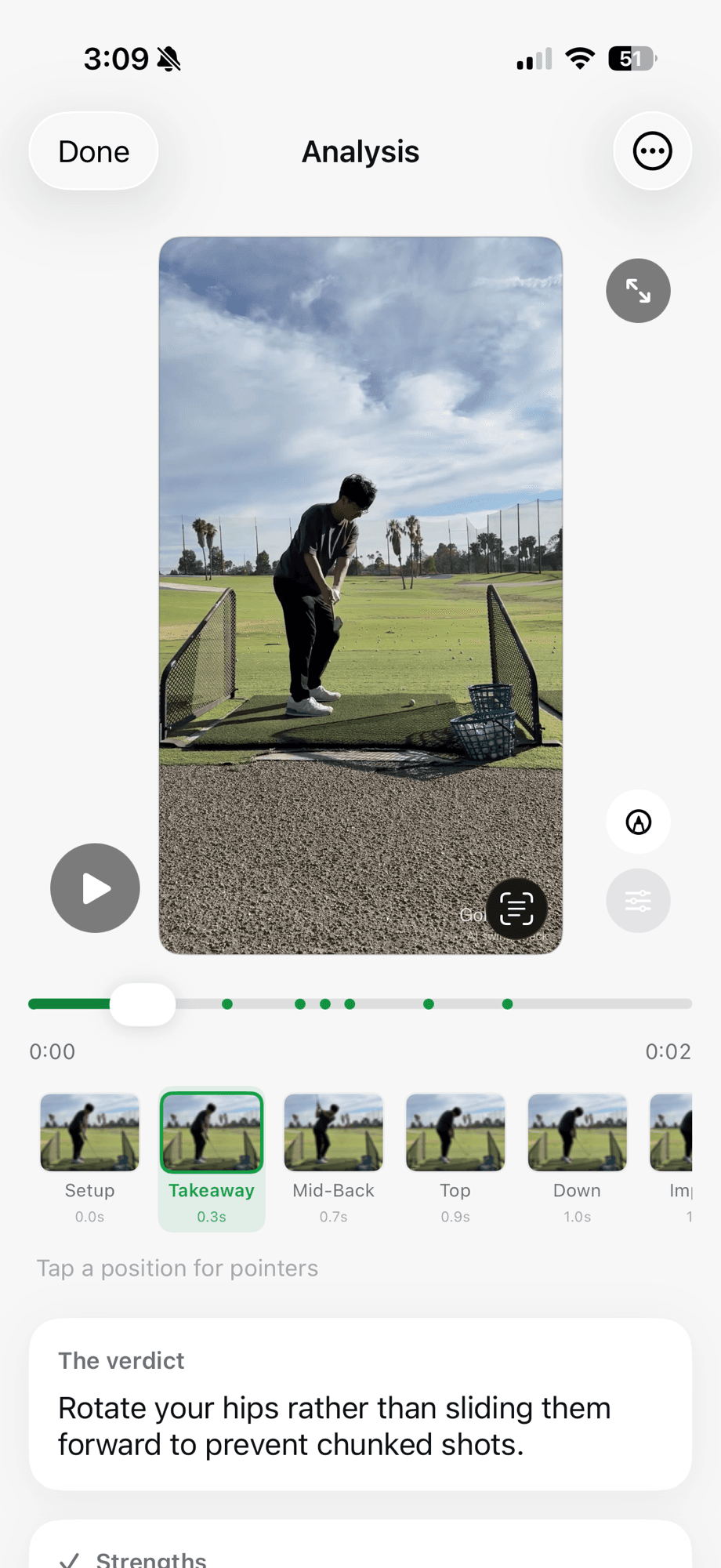
The goal is not to produce the longest swing report. It is to make the next practice decision clearer.
What Golf Lab AI does
Finds the swing
Record in the app or choose a video. Golf Lab AI detects the motion and trims the useful swing window.
Maps eight positions
Review setup, takeaway, mid-back, top, downswing, impact, release and finish.
Chooses one priority
The verdict names the pattern the analysis considers most important instead of stacking unrelated tips.
Pairs it with one drill
Each verdict comes with a rehearsal and a success check so the golfer knows what to test.
Tracks the pattern
History makes it possible to compare practice sessions rather than treating every clip as a new problem.
Opens a coach thread
Share a swing so a coach or trusted friend can comment at the right moment and draw on the video.
The three-step practice loop
- Capture: prop up the iPhone, choose down-the-line or face-on and hit a normal shot.
- Prioritize: read the verdict, inspect the relevant positions and understand the recommended drill.
- Re-check: record the same club and view after practicing, then compare the pattern and resulting shot.
What it is—and what it is not
| Golf Lab AI is | Golf Lab AI is not |
|---|---|
| A video-based swing check-in | A launch monitor measuring the ball or club |
| A way to prioritize one practice theme | A guarantee that one drill fixes every cause |
| A tool for tracking and sharing practice | A replacement for a qualified teaching professional |
| Dependent on useful camera framing | A reliable diagnosis from any angle or obstructed video |
Camera angle can materially change how the club and body look. Start with the filming guide, and use ball flight and strike context when deciding whether a verdict deserves practice time.
Free and Pro plans
Free
$0
Three swing check-ins per month so you can test the complete result on your own swing.
Pro
$9.99 monthly
$59.99 annually. Includes unlimited check-ins, full history and drawing tools. Current App Store pricing controls at checkout.
Privacy before analysis
Swing tracking begins on the device. Before an AI request, the app identifies Google and explains what will be sent. You can decline or later revoke consent. Golf Lab AI says it does not send your name, email or precise location in the AI request and does not use your videos to train AI models. Read the full privacy policy and analysis methodology.
Common questions
Do I need a tripod?
No special sensor is required. A stable phone mount is the most repeatable setup, but a range bag or safe fixed support can work if it keeps the lens still and the full club in frame.
Can I use face-on and down-the-line video?
Yes. The two views reveal different relationships. Try to repeat the same view when judging change between sessions.
Can the app see what the ball did?
You can record the club and shot context, but Golf Lab AI is not a launch monitor. Actual face angle, path and ball-flight measurements require appropriate hardware.
Keep learning
Film a useful swing video
Set your phone for repeatable face-on and down-the-line analysis.
Understand the eight positions
See what each checkpoint reveals from setup through finish.
Explore common swing patterns
Learn the video signs, possible causes and limits of common fault labels.
Compare Golf Lab AI and V1 Golf
A factual comparison of workflow, coaching features and current pricing.