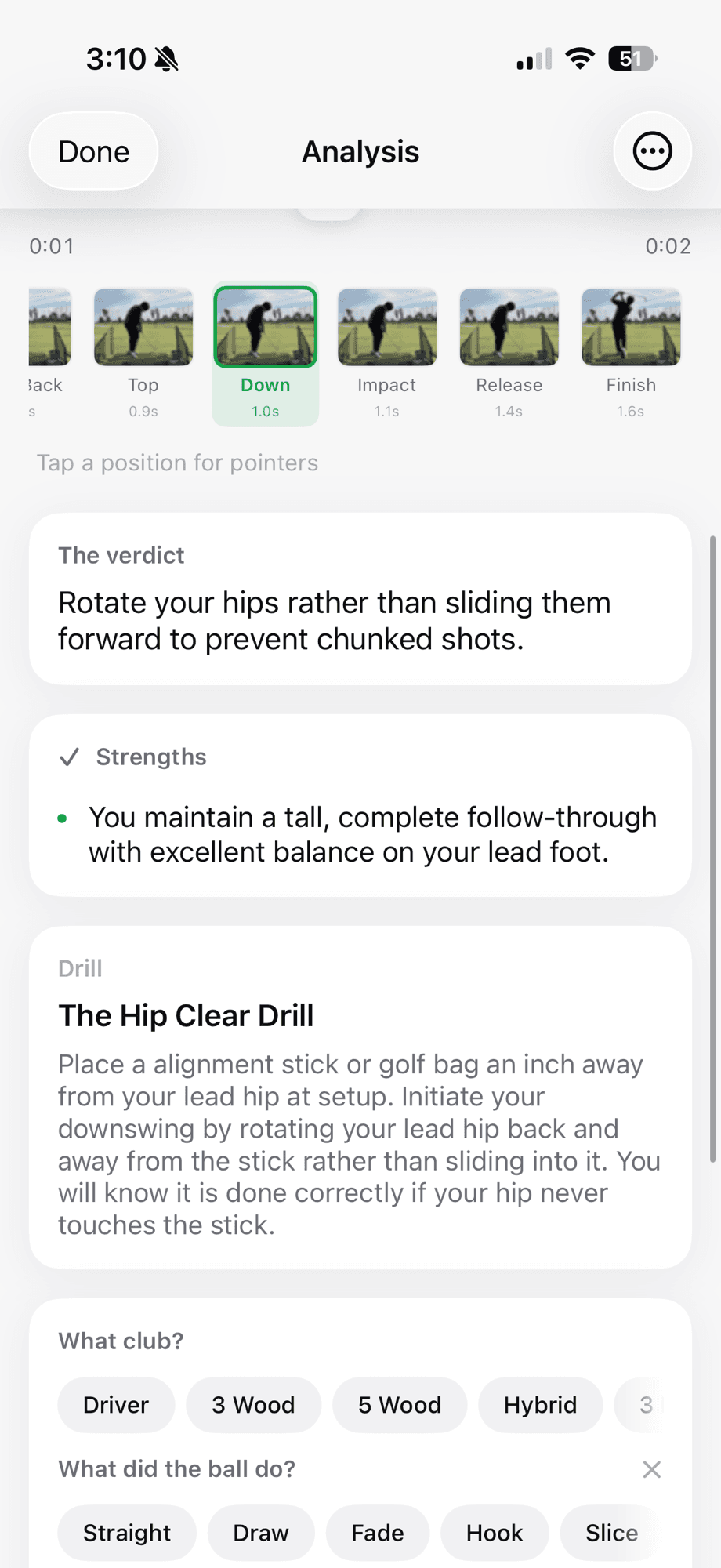
Golf Lab AI is designed to produce a useful practice hypothesis, not an unquestionable diagnosis. Camera quality, shot context and human judgment still matter.
The analysis flow
- Capture or select: the golfer records a swing in the app or chooses an existing clip.
- Detect and trim: on-device tracking identifies the swing window so the useful motion can be reviewed without manual scrubbing.
- Confirm consent: before any AI request, the app identifies Google and explains what will be sent. The golfer can decline.
- Map eight positions: setup, takeaway, mid-back, top, downswing, impact, release and finish become navigation checkpoints.
- Generate observations: the AI returns position-level notes and practical language about the visible motion.
- Prioritize: Golf Lab AI presents one verdict and one associated drill instead of treating every observation as a new swing thought.
What the AI receives
The app shows the disclosure before analysis and asks for explicit consent. According to the current product disclosure, the request can include swing video or selected swing imagery and relevant swing context. It does not include the golfer’s name, email address or precise location as part of the AI analysis request.
Consent can be declined or revoked. Golf Lab AI states that swing videos are not used to train AI models. Review the privacy policy for the current data-handling terms.
What the analysis can usefully do
- Navigate quickly to repeatable moments in the swing.
- Describe visible patterns in plain language.
- Reduce a long list of observations to one practice priority.
- Attach one drill and a success check to that priority.
- Create a shared artifact that a coach or trusted golfer can review.
- Track whether the same pattern appears across practice sessions.
Important limitations
| Limitation | Why it matters |
|---|---|
| Camera perspective | Plane, posture and movement can look different when height, tilt or alignment changes. |
| Ordinary video | The app is not directly measuring launch, force, face angle or path like dedicated hardware. |
| Visible pattern versus cause | The frame where a problem appears may not contain the movement that caused it. |
| Individual anatomy and intent | Effective golfers do not all occupy identical positions. |
| AI variability | Generated language can be incomplete or wrong and should be checked against the video and resulting shot. |
How these educational guides are created
Golf Lab AI’s public swing guides explain common labels and safer ways to observe them. They are written from the product’s position framework and public golf-instruction references, with uncertainty stated where a video cannot prove the cause. They are not presented as individualized lessons or as coach-reviewed diagnoses.
We will update guides when the product behavior, evidence or terminology changes. Corrections can be sent to support@golflabai.com.
Keep learning
See the complete product
Review the workflow, free plan, Pro pricing and practical use cases.
Improve the input video
Use stable, repeatable camera placement before evaluating a verdict.
Understand the eight positions
Learn what every checkpoint can and cannot reveal.
Read the swing-fault library
Explore visible patterns with causes clearly separated from labels.